
Deploying React Router 7 to AWS Amplify with Full SSR Support
A step-by-step guide to deploying server-side rendered React Router 7 applications to AWS Amplify using the vite-plugin-react-router-amplify-hosting adapter.
If you've tried deploying a server-side rendered React Router 7 app to AWS Amplify, you've probably noticed something frustrating: Amplify only officially supports SSR for Next.js. Everything else gets treated as a static site.
React Router 7 (the framework formerly known as Remix) is a powerful full-stack framework with first-class SSR support, data loading, and nested routing. It deserves proper SSR deployment, not a workaround.
The good news? A community adapter called vite-plugin-react-router-amplify-hosting makes full SSR deployment to Amplify work. This very site you're reading runs on this exact stack. I'll walk you through setting it up from scratch.
Prerequisites
Before we start, make sure you have:
- An AWS account with access to Amplify
- Node.js 20 or later installed locally
- A Git repository on GitHub, GitLab, or Bitbucket
Step 1: Create a React Router 7 App
If you don't already have a React Router 7 app, create one using the official CLI:
npx create-react-router@latest my-amplify-app
cd my-amplify-app
npm install
This gives you a fully configured React Router 7 project with Vite, TypeScript, and SSR enabled by default. The template includes:
- File-based routing in
app/routes/ - A root layout component
- TypeScript configuration
- Tailwind CSS (optional, depending on template choice)
Step 2: Install the Amplify Hosting Plugin
Install the Vite plugin that generates the Amplify-compatible build output:
npm add -D vite-plugin-react-router-amplify-hostingYou'll also need the runtime dependencies for the Express server that handles SSR:
npm add compression express isbot morgan @react-router/expressHere's what each package does:
- compression - Gzip compression middleware for faster responses
- express - The web server that runs your SSR code in Lambda
- isbot - Detects bots/crawlers to optimize SSR behavior
- morgan - HTTP request logging for debugging
- @react-router/express - React Router's Express adapter
Step 3: Configure Vite
Update your vite.config.ts to include the Amplify hosting plugin:
import { reactRouter } from "@react-router/dev/vite";
import { defineConfig } from "vite";
import tsconfigPaths from "vite-tsconfig-paths";
import { amplifyHosting } from "vite-plugin-react-router-amplify-hosting";

export default defineConfig({
  plugins: [
    reactRouter(),
    tsconfigPaths(),
    amplifyHosting(),
  ],
});
The amplifyHosting() plugin does the heavy lifting. It:
- Bundles your server code into a single
server.mjsfile - Generates a
deploy-manifest.jsonthat tells Amplify how to route requests - Organizes everything into the
.amplify-hosting/directory structure Amplify expects
Step 4: Verify SSR is Enabled
Check your react-router.config.ts to ensure SSR is enabled (it's on by default):
import type { Config } from "@react-router/dev/config";

export default {
  ssr: true,
} satisfies Config;
With ssr: true, your route loaders run on the server, meta tags are rendered server-side for SEO, and users get fully rendered HTML on the first request.
Step 5: Create the amplify.yml Build Spec
This is the critical part. Create an amplify.yml file in your project root:
version: 1
frontend:
  phases:
    preBuild:
      commands:
        # Force Node 20+ (required for Vite 7 and React Router 7)
        - nvm install 20
        - nvm use 20
        - node -v
        - npm -v
        # Clean install to fix platform-specific dependencies
        - rm -rf node_modules package-lock.json
        - npm cache clean --force
        - npm install --legacy-peer-deps
        # Workaround: Explicitly install Linux rollup binary
        - npm install @rollup/rollup-linux-x64-gnu --save-optional --legacy-peer-deps
    build:
      commands:
        - npm run build
  artifacts:
    baseDirectory: .amplify-hosting
    files:
      - '**/*'
  cache:
    paths: []
rollup/rollup-linux-x64-gnu
This deserves explanation because it will save you hours of debugging.
Rollup (which Vite uses under the hood) has platform-specific native binaries. When you run npm install on your Mac or Windows machine, npm installs the binary for your platform. But Amplify builds on Linux.
The problem: npm's optional dependency handling sometimes fails to install the Linux binary when the lockfile was generated on a different platform. The build fails with cryptic errors about missing rollup binaries.
The solution: We nuke node_modules and package-lock.json, then explicitly install the Linux rollup binary. It's not elegant, but it works reliably.
I also disable caching (paths: []) because cached node_modules from a previous build can cause the same platform mismatch issues.
Step 6: Connect to AWS Amplify
Now let's deploy:
- Go to the AWS Amplify Console
- Click Create new app > Host web app
- Choose your Git provider (GitHub, GitLab, Bitbucket, or CodeCommit)
- Authorize Amplify and select your repository and branch
- Amplify will detect your
amplify.ymland use it for build settings - Click Save and deploy
The first build takes a few minutes. Once complete, Amplify gives you a URL like https://main.d1234abcd.amplifyapp.com.
Understanding the Build Output
After running npm run build, the plugin generates a .amplify-hosting/ directory:
.amplify-hosting/
├── compute/
│   └── default/
│       └── server.mjs      # Bundled Express server (~3MB)
├── static/
│   ├── assets/             # Hashed JS/CSS bundles
│   ├── fonts/
│   ├── images/
│   └── ...
└── deploy-manifest.json    # Routing configuration
The deploy-manifest.json tells Amplify how to route requests:
{
  "version": 1,
  "framework": {
    "name": "react-router",
    "version": "7.10.1"
  },
  "routes": [
    {
      "path": "/assets/*",
      "target": { "kind": "Static" }
    },
    {
      "path": "/*.*",
      "target": { "kind": "Static" },
      "fallback": { "kind": "Compute", "src": "default" }
    },
    {
      "path": "/*",
      "target": { "kind": "Compute", "src": "default" }
    }
  ],
  "computeResources": [
    {
      "name": "default",
      "runtime": "nodejs20.x",
      "entrypoint": "server.mjs"
    }
  ]
}
The routing strategy is:
/assets/*- Served directly from CloudFront CDN (static files)/*.*- Try static first, fall back to compute (for files likerobots.txt)/*- All other routes go to Lambda for SSR
How SSR Works at Runtime
Here's what happens when a user visits your site:
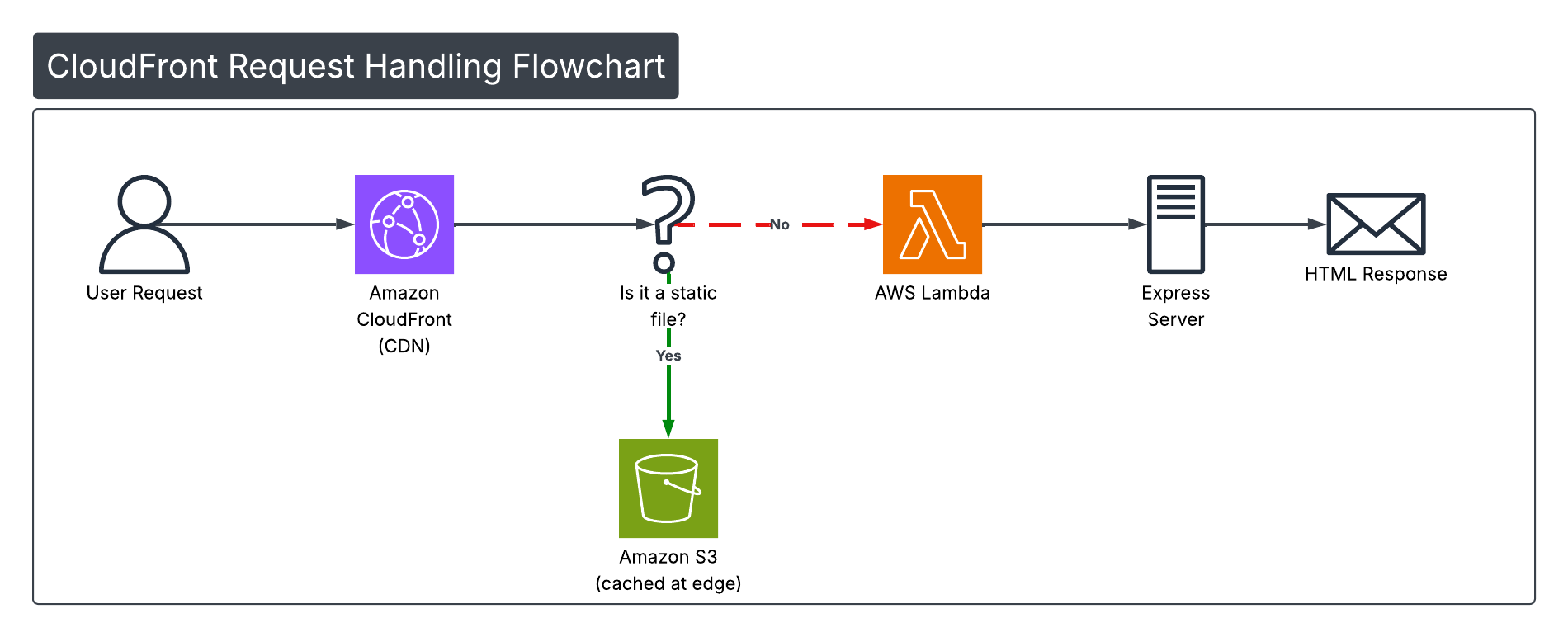
When a request comes in, CloudFront checks if it's a static file. If yes, it serves directly from S3 (cached at the edge). If not, the request goes to Lambda where your Express server runs React Router's SSR pipeline: executing loaders, rendering components to HTML, injecting meta tags, and serializing data for hydration.
Static assets are served from S3 via CloudFront with aggressive caching (the filenames include content hashes). Dynamic routes hit a Lambda function running your Express server, which executes React Router's SSR pipeline.
Gotchas and Troubleshooting
Build fails with "Cannot find module @rollup/rollup-linux-x64-gnu"
This is the platform mismatch issue. Make sure your amplify.yml includes the clean install steps and explicit rollup binary installation.
Build fails with Node version errors
React Router 7 and Vite require Node 20+. Ensure your amplify.yml includes:
- nvm install 20
- nvm use 20
Subsequent deploys fail with cached issues
If a deploy works once then fails, try clearing the build cache in the Amplify Console: App settings > Build settings > Clear cache.
First request is slow (cold start)
The first request after a period of inactivity takes 1-3 seconds because Lambda needs to spin up. Subsequent requests are fast. This is normal for Lambda-based SSR. If cold starts are a problem, consider:
- Enabling Amplify's provisioned concurrency (costs more)
- Using React Router's prerendering for static pages
SSR works locally but not on Amplify
Check that your loaders don't use Node APIs that aren't available in Lambda, and ensure any environment variables are set in Amplify's environment variable settings.
Fun Fact: ChatGPT Runs on This Stack
In September 2024, OpenAI switched ChatGPT's frontend from Next.js to Remix (now React Router 7). The move made waves in the developer community.
So when you're deploying React Router 7 to Amplify, you're using the same framework that powers one of the most-used AI applications on the planet.
Conclusion
You now have a fully server-side rendered React Router 7 application running on AWS Amplify. Your users get fast initial page loads with pre-rendered HTML, search engines can crawl your dynamic content, and you have the full power of React Router's data loading patterns.
The setup requires a few workarounds (thanks, rollup binaries), but once configured, deploys are automatic on every push to your repository.
This site runs on this exact stack. If you're reading this, the deployment works.
Resources
Enjoyed this post?
I write about AWS, React, AI, and building products. Have a project in mind? Let's chat.